In the previous article titled Introduction to Unity 3.5 I introduced the Unity interface and we created a simple project that shows a rotating cube. In this article, I want to introduce some basic Unity concepts such as the Asset pipeline and the GameObject-Component model and introduce a few of the Components that Unity provides. I will not go into too much detail about the different components in this article (I will dedicate a different article for each of the more complex components such as Terrain, Particle Effects, Physics, Audio, and Scripts).
Tag Archives: rendering
Introduction to Unity 3.5
In this article, I will introduce you to the Unity game editor. Unity is a tool for creating and deploying games to PC, consoles, web and mobile devices. In this post, I will go through the steps to get Unity installed on your computer and I will introduce you to the basic features of Unity. Unity makes it easy for anyone to get started making games. You will not need any previous game development experience to follow these articles but by the end, you will be prepared to start making your own games like a professional!
Transformation and Lighting in Cg 3.1
In this article I will demonstrate how to implement a basic lighting model using the Cg shader language. If you are unfamiliar with using Cg in your own applications, then please refer to my previous article titled Introduction to Shader Programming with Cg 3.1.
This article is an updated version of the previous article titled Transformation and Lighting in Cg. In this article, I will not use any deprecated features of OpenGL. I will only use the core OpenGL 3.1 API.
Introduction to Shader Programming with Cg 3.1
In this article I will introduce the reader to shader programming using the Cg shader programming language. I will use OpenGL graphics API to communicate with the Cg shaders. This article does not explain how use OpenGL. If you require an introduction to OpenGL, you can follow my previous article titled Introduction to OpenGL.
Using OpenGL Vertex Buffer Objects
In this article, I will explain how to use the ARB_vertex_buffer_object extension to efficiently render geometry in OpenGL.
If you are not sure how to use extensions in OpenGL, you can refer to my previous article titled OpenGL Extensions. If you have never programmed an OpenGL application before, you can refer to my previous article titled Introduction to OpenGL.
Texturing and Lighting in OpenGL
In this article, I will demonstrate how to apply 2D textures to your 3D models. I will also show how to define lights in your scene that are used to illuminate the objects in your scene.
I assume that the reader has a basic knowledge of C++ and how to create and compile C++ programs. If you have never created an OpenGL program, then I suggest that you read my previous article titled “Introduction to OpenGL” here before continuing with this article.
Introduction to OpenCL
In this article I will provide a brief introduction to OpenCL. OpenCL is a open standard for general purpose parallel programming across CPUs, GPUs, and other programmable parallel devices. I assume that the reader is familiar with the C/C++ programming languages. I will use Microsoft Visual Studio 2008 to show how you can setup a project that is compiled with the OpenCL API.
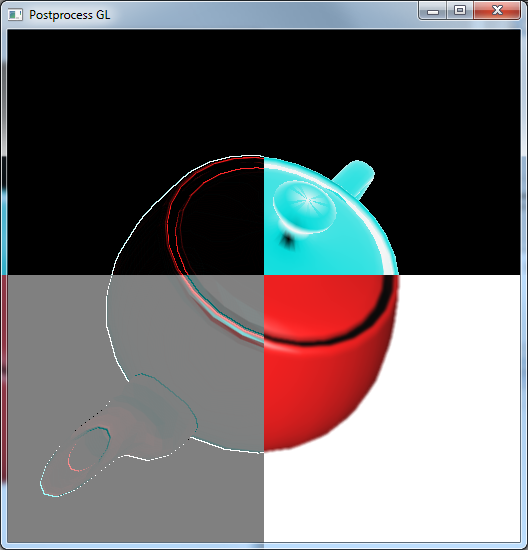
OpenGL Interoperability with CUDA
In this article I will discuss how you can use OpenGL textures and buffers in a CUDA kernel. I will demonstrate a simple post-process effect that can be applied to off-screen textures and then rendered to the screen using a full-screen quad. I will assume the reader has some basic knowledge of C/C++ programming, OpenGL, and CUDA. If you lack OpenGL knowledge, you can refer to my previous article titled Introduction to OpenGL or if you have never done anything with CUDA, you can follow my previous article titled Introduction to CUDA.
Projected Shadow Mapping with Cg and OpenGL
In this article, I will show how to implement projective shadow mapping in OpenGL using Cg shaders.
The basis of this post comes from the article titled [Transformation and Lighting in Cg]. I will assume the reader has a basic understanding of OpenGL and already knows how to setup an application that uses OpenGL. If you require a refresher on setting up an application using OpenGL, you can refer to my previous article titled [Introduction to OpenGL for Game Programmers].
I will take advantage of a few OpenGL extensions such as GL_ARB_framebuffer_object to create a offscreen framebuffer to render to and and GL_ARB_texture_border_clamp for clamping to the border color of the projective textures.
Normal Mapping with Cg and OpenGL
In this article, I will discuss a technique called normal mapping. Normal mapping is a shader technique that encodes pre-computed surface normals in a texture that can be used to add extra detail to a surface without the requirement of adding extra geometry. Before reading this article, you should have a basic understanding of OpenGL and you should know how to setup a Cg shader. For a review on OpenGL, you can refer to my previous article titled [Introduction to OpenGL for Game Programmers] and to learn how to incorporate Cg shaders in your own applications, you can refer to my article titled [Introduction to Cg Runtime with OpenGL].